iSizing Starter Guide

A step-by-step guide to creating your account and accessing AI-powered automated EVAR sizing. Follow the Account creation Guide steps below to register for iSizing and begin your free trial.
Step 1: Visit the PrediSurge Website
Open your web browser and go to www.predisurge.com. On the homepage, click the "Get Started" button in the top-right corner of the navigation bar, or navigate directly to the iSizing product page and click ''Free Trial''
Step 2: Complete the Registration Form

You will be presented with the 'Create your account' form. Fill in all required fields:
- First Name and Last Name
- Country — select your country from the dropdown
- Institution — enter the name of your hospital, clinic, or organisation
- Email Address — use a professional or institutional email
- Password — create a secure password and confirm it in the field below
- Once all fields are complete, tick the boxes to confirm you agree to the Terms of Use and have read and accepted the Privacy Policy.
- Then click 'Create an account'.
Step 3: Verify Your Email Address
After submitting the form, you will receive a 'Welcome to PlanOp.ai' verification email. The email contains a 'Verify my email' button — click it to activate your account.
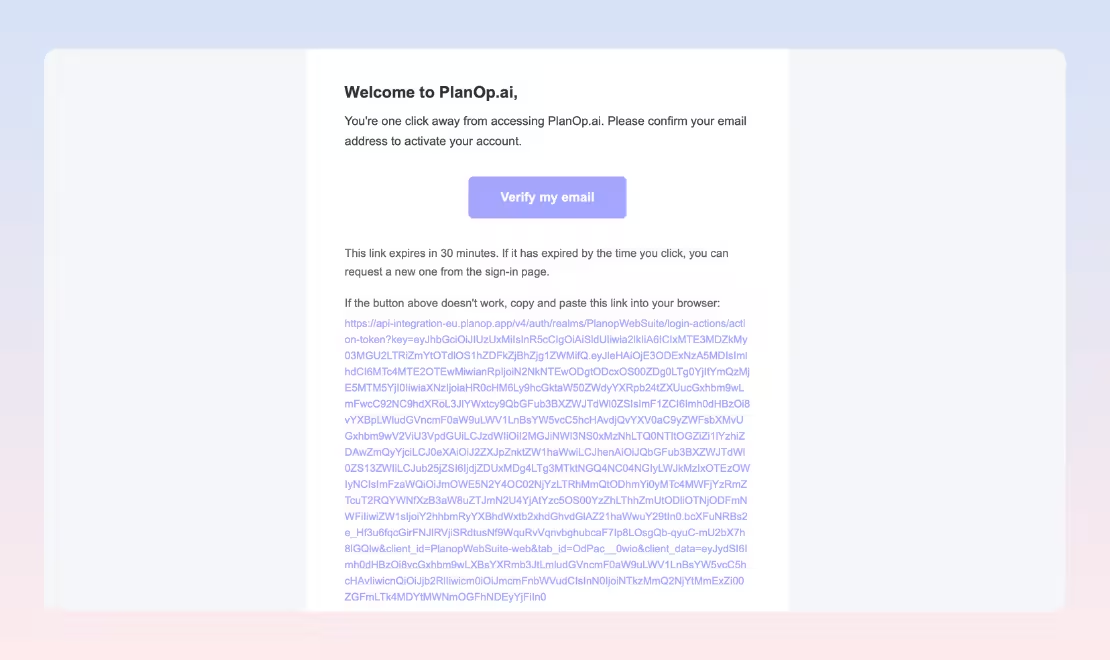
Important: The verification link expires after 30 minutes. Please verify promptly. If the link has expired, you can request a new one from the sign-in page. If the button does not work, copy and paste the full verification URL provided in the email into your browser.
Step 4: Access Your iSizing Account
Upon successful email verification, you will be automatically redirected to your iSizing account on the PlanOp platform. Your account is now active. You can immediately begin uploading CT scans and exploring the automated sizing workflow.
Note: If your country is not available in the dropdown
If your country does not appear in the dropdown list, it means iSizing is not yet commercially available in your area. In this case, a message will appear: 'Your country isn't listed?
We encourage you to subscribe to the PrediSurge`s newsletter via the link provided. You will be among the first to be notified when iSizing becomes available in your country as we continue to expand our regulatory clearances.
User Guide for iSizing: From automated measurements to one-click report generation.
With automated measurements, one-click report generation, and clinically validated accuracy, iSizing empowers your EVAR planning while saving time, reducing operator variability, and enhancing your decision-making.
Perform your sizing by following the steps:
- Log in to PlanOp, To request iSizing, Click on "Create a new case".
- Fill the case details fields and click on "Next".
- Upload the CT Scan of your case.
- Once the file is uploaded, View it on free MPR viewer if you want to preview the CT scan before "Requesting for autosizing" with the series you prefer.
- Go to the previous tab or click on the "Home icon" to request an autosizing.
- Click on "Request an autosizing" to get automated sizing measurement with segmentation.
- Once the sizing measurements are available, plan your EVAR intervention by clicking on the "S" icon.
- Click anywhere along the Centerline to visualise measurements for each millimeter.
- Select the main body diameters and extensions by clicking on "Device Selection" button and visualise on 3D model instantly.
- Click on "Generate sizing & Planning" to get a sizing report.